Operation
|
Start PROPER under ‘Programs’ / ‘Proper’ / ‘Proper’ .
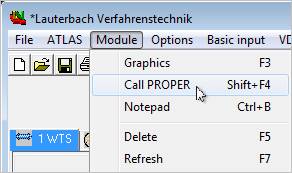
Furthermore, PROPER can also be started from the ATLAS, WTS, KOND, VERD, MUKO, and AC module packages. Use the "Call PROPER" menu item in the "Module" menu in the specific module package. Of course, it is only available there if you have installed PROPER.
|
|

After starting PROPER the "PROPER" window appears on the screen.
To generate stream properties, it is necessary to define the composition of the components of the stream first. There are two possibilities to define the stream components:
1. Recall an old stream from file
2. Define a new component stream
|
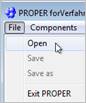
A saved material flux file containing the components, the concentrations, the calculation methods, the pressure and the temperature can be loaded into PROPER. After selecting the "Load" menu item in the "File" menu a selection box which displays the saved flux files (standard extension *.str) appears. |
|
|
|
|
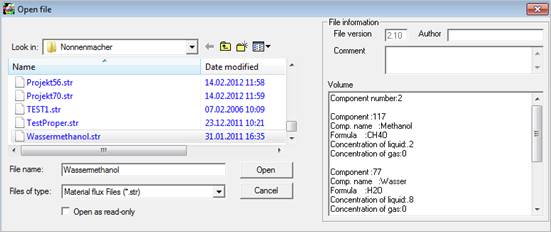
By double-clicking the desired file or clicking the file and pressing the "Load" button the file is loaded into PROPER. The contents of the selected file showing the names of the components, their concentrations, the selected calculation methods etc. are displayed in the ‘Volume’ field on the right.
It is possible to add further components to a saved flux file (see "Select mixture components").
|
Find
the ´Select Components´ window by
|
|
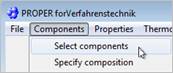
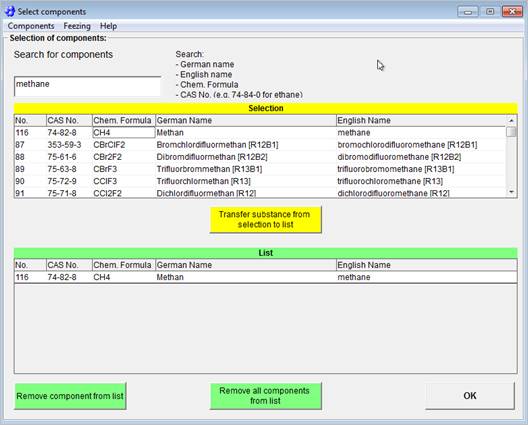
In this window select the components from the data base that PROPER is based on.
Search for
· German name (complete German name of the component)
· English name (complete English name of the component)
· chemical formula
· CAS Registry number
To search a chemical formula or partial formula the following convention for the structure of a chemical formula has to be kept:
1. C atoms at first position
2. H atoms at second position
3. Then the remaining atoms in alphabetical order.
|
Examples: |
Methanol |
CH4O |
|
|
Ammonia |
H3N |
|
|
Bromochlorodifluoromethane |
CBrClF2 |
To add a component to the mixture composition (lower list) double-click the component or single click it and confirm by pressing the "Transfer substance from selection to list" button.
The mixture is displayed in the lower list . You can select up to 15 components for one mixture. When using the DDB-flash (only available in the extended version: calculation of the phase equilibrium with the PSRK method according to DDDBst, Prof. Gmehling) the selection is limited to 10 components.
The "Remove all components from selection /list" button removes all components from the according list. Single components that have been selected can be deleted with "Remove component from selection / list".
The selection of components is terminated with the "OK" button. The components of the lower list are transferred to the material flux.
For pure substances the standard setting is for the concentration is 100 %. For a mixture the "Specify concentration" window opens where the concentrations have to be entered. The "Specify concentration" window may also be reached in the "Components" menu in the "Specify concentration" menu item.
The material flux can be saved with the "Save as" menu item in the "File" menu. The "Save" menu item is only active if the flux file has been loaded before.
After one or several components have been selected in the "Select stream components" window and transferred to the stream contents, the concentrations of the components have to be specified which is done in the "Specify composition" window.
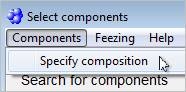
If it is a multi component mixture this window is opened automatically after pressing the "OK" button in the "Select components" window. If it is a single substance, its concentration is set to 100 % after pressing the "OK" button and the "Specify concentrations" window does not open. The "Specify composition" window can also be reached by "Components" / "Specify composition".
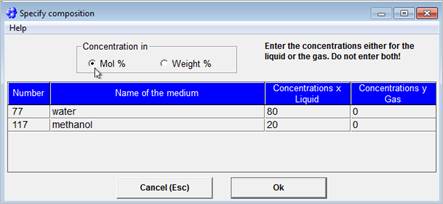
The component number and name and the concentrations in the gas phase and liquid phase are displayed.
You can enter the values directly into the table - either in Mol% or in Weight%.
The standard setting is Mol%. Activate "Weight%" before entering values in Weight%.
Internally PROPER only calculates with Mol%. If you open this window a second time after entering values in Weight% the concentrations will have been converted to Mol%. If the sum of the concentrations in the gas and liquid phases does not add up to 100 %, the program automatically normalizes the concentrations to 100 %. For pure substances PROPER automatically normalizes the liquid concentration to 100 %.
If the phase equilibrium for a mixture has to be calculated before generating the properties of the gas or liquid phase, the feed concentrations have to be entered in the "Concentrations x Liquid" column.
If the phase check is not required due to given stream concentrations of the liquid and/or gaseous stream, enter the concentrations of the liquid mixture into the "Concentrations x Liquid" column or the concentrations of the gas mixture in the "Concentrations y Gas" column.
With "OK" the concentrations are assigned to the mixture. With "Cancel (ESC)" the modifications are dropped and the previous values are taken.
The stream can be saved with the "Save as" menu item in the "File" menu. The "Save" menu item is only active, if a flux file has been loaded before.
|
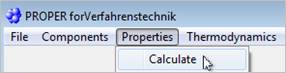
The "Calculate" menu item in the "Properties" menu of the "PROPER" window is activated only if a flux file has been loaded or a new mixture with components and concentrations has been composed. After selecting this menu item the "Specify options" window is displayed. |
|
|
PROPER is able to calculate 17 properties for single substances or mixtures. · Molecular weight of mixtures MW [g/mol] · Gas constant R [J/(kg·K)] · Compressibility Z [-] ·
Density ·
Dynamic viscosity ·
Kinematic viscosity · Specific heat capacity cp [J/(kg·K)] · Specific heat capacity cv [J/(kg·K)] ·
Isentropic coefficient ·
Thermal conductivity ·
Coefficient of thermal expansion ·
Surface tension · Diffusion coefficients D [m²/s] · Specific enthalpy h [kJ/kg] · Prandtl number Pr = n / a = h · cp / l [-] · Lewis number Le = a / D [-] ·
Thermal diffusivity |
|


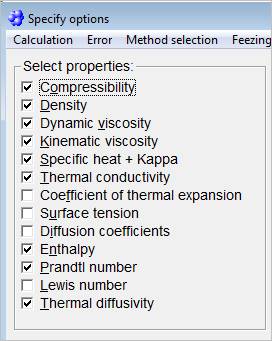
The properties to be calculated are selected with mouse or keyboard and marked with a check. The nine properties required most frequently are the default selection. The user can deactivate them.
For the calculation of the diffusion coefficients and the surface tensions manual inputs are required in some cases.
The user can decide which calculation methods are to be used for the calculation of the liquid density, the diffusion coefficients of liquids, the vapour pressure of pure substances and the specific heat capacity of liquids. If no calculation method has been selected the default methods are used (see section "Selection of methods").
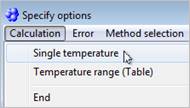
You can calculate the property values for a single temperature or for several temperatures over a temperature range. Select ´Single temperature´ or ´Temperature range (table)´ from the ´calculation´ menu.
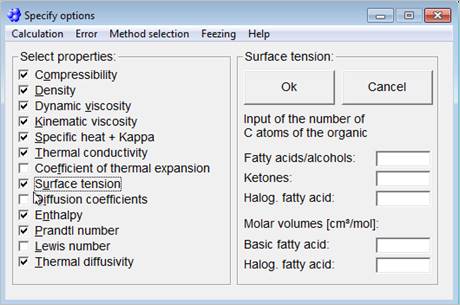
To calculate the surface tension of a binary mixture consisting of an organic component and water, manual inputs by the user are required. Depending on the type of the organic component (fatty acid / alcohols, ketones, halogenated fatty acid) the number of C-atoms has to be entered into one of the three fields. For halogenated fatty acids it is also necessary to enter both the molar volume of the halogenated fatty acid and the molar volume of the corresponding non-halogenated fatty acid.
Confirm your input with the "Confirm input" button or deactivate the calculation of the surface tension with the "Cancel" button.
The surface tension of a mixture consisting of water and two or more organic components can not be calculated.
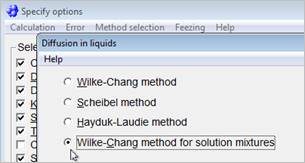
For calculation of the diffusion coefficient of binary liquids mixtures four calculation methods are available which can be selected by "Selection of methods" / "Liquid diffusion".
For mixtures of more than two components the diffusion coefficient of the first component is calculated in a pseudo component composed of the remaining components.
In these cases the "Wilke-Chang-method for solution mixtures" is always applied.
The binary diffusion coefficients Dij are not calculated.
|
In gases mixtures the diffusion coefficients are considered as independent from the composition. Keeping this assumption PROPER calculates the binary diffusion coefficients Dij for gas mixtures. The binary diffusion coefficients Dij are
calculated in the "Calculate properties" window and are displayed
separately in the "Diffusion coefficients" menu. The number of
components for calculation of the binary diffusion coefficients in the
gaseous phase is limited In addition to the binary diffusion coefficients also the diffusion coefficient of the first component is calculated in a pseudo component composed of the remaining components. |
|
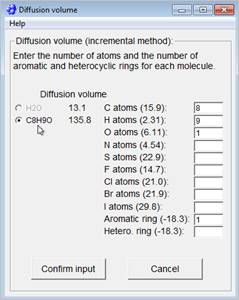
For calculation of the binary diffusion coefficients according to Fuller, Schettler and Giddings the diffusion volumes of the single components are required. The diffusion volumes are calculated according to the incremental method and are contained in a data library for the most common components. If the diffusion volume of a component is missing for a gaseous mixture, the "Diffusion volume" window opens automatically after clicking the "Diffusion coefficients" option in the "Specify options" window.
In this window enter the number of atoms as well as the number of aromatic and heterocyclic rings for the molecule of which the option field is marked. PROPER automatically multiplies the entered values by the specified factors, adds up the results and displays them under diffusion volume.
Example: Acetanilide C8H9O
|
C-atoms |
8 |
|
H-atoms |
9 |
|
O-atoms |
1 |
|
Aromatic ring |
1 |
|
Diffusion volume |
135.8 |
There are different methods to calculate the liquid density, the diffusion coefficient of liquids and the vapour pressure of pure substances with PROPER. For each property the method with the largest validity range is given as default. The method is selected in the "Calculate properties" window in the "Methods" menu. The methods selected by the user are saved with the components and their molar percentages.
As default method the Hankinson-Brobst-Thomson (HBT) method is given. You can also select the Lee-Kesler method, the Gunn-Yamada method or the Rackett method.
The default method is the Hayduk-Laudie method. Further methods are the methods of Wilke-Chang (H2O in organic media or solution mixtures) and the method of Scheibel. These methods can only be selected, if the current stream consists of two or more components.
For many pure substances the database provides coefficients of a polynomial to calculate the vapour pressure. The exactness of the polynomials is very high within the valid temperature range. For substances without given coefficients or for calculations outside the temperature range alternate methods are offered. These substitute methods are: method of Lee-Kesler, method of Gomez-Thodos for polar substances (default) and method of Gomez-Thodos for non-polar substances.
The Lee-Kesler method is given as default. For polar substances like monovalent alcohols the Lyman-Danner method is recommended.
|
The properties are calculated and the results are presented in the "Single temperature" window for properties for one temperature, or in the "Calculate table" window for properties over a temperature range. |
|
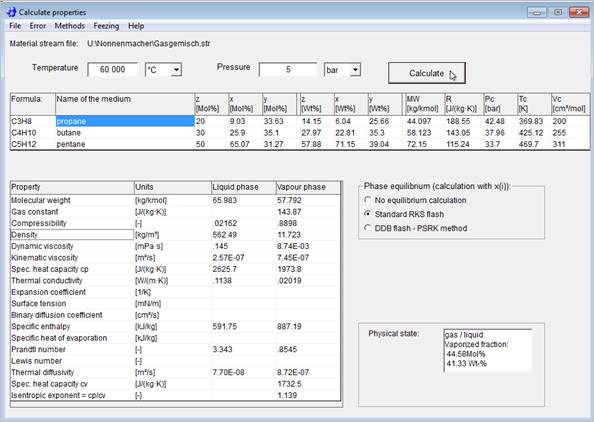
In the "Calculate properties" window the property data are calculated and displayed along with the composition of the mixture. Before starting the calculation the temperature [°C] and the pressure [Pa] have to be entered into the corresponding fields. The temperature and the pressure can be entered in different selectable units.
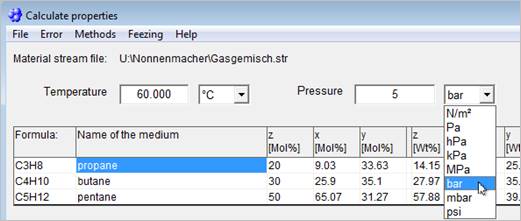
The calculation can be started with the "Calculate" button. The physical state liquid or gaseous is checked automatically for pure substances.
For mixed streams the phase equilibrium model has to be selected (no phase equilibrium calculation, standard RKS flash or flash with DDB according to PSRK method). If "No phase equilibrium calculation" is activated, the properties are calculated for the phase the concentrations are given for (liquid or gaseous, see section "Specify component concentrations").
|
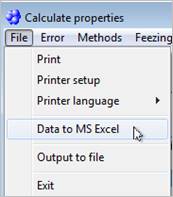
The calculated property data are displayed in the current window "Calculate properties". The next calculation can be started after entering a new pressure and/or a new temperature and pressing the "Calculate" button. The results of the current calculation can be saved in a file (ANSI) or sent to a printer, a file or to MS Excel.
The printout is executed via the Windows
print manager where the settings concerning the printer type or printer port
must be declared. The language for the file and printer output can be set in
the
|
|
In the "Diffusion coefficients" menu the binary diffusion coefficients of the gaseous phase (Di,j) can be displayed and printed. The "Diffusion coefficients" menu is only active if the "Diffusion coefficients" option has been selected in the "Select options" menu and the mixture has a gaseous phase at T and p.
In the "Methods" menu the methods defined by the user and required for the calculation are displayed.
After entering either the pressure or the temperature and pressing the "Calculate" button, the remaining variable for the boiling point determination is calculated.
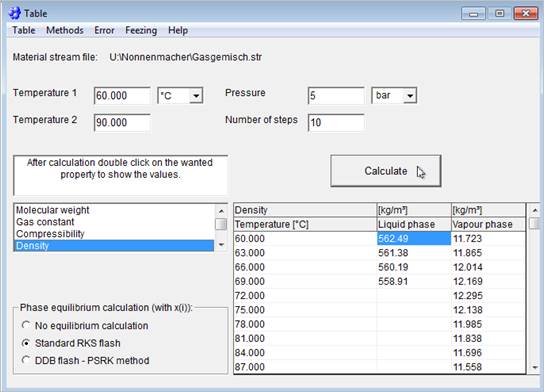
The properties over a temperature range are calculated and displayed in the "Table" window.
The calculation requires two temperatures [°C], the system pressure and the number of steps between the two temperatures.
With the "Calculate" button the calculation gets started. The calculation is only possible over a temperature range, not over a pressure range. The physical state of the stream is automatically checked if the stream consists of only one pure component.
If the stream consists of multiple components, the program asks whether the physical state should be checked. This question does not appear a second time if further calculations with that stream are made.
Select a property by double clicking at the lower-left selection list when the calculation has been finished to display the calculated property data over the temperature range.
The results currently displayed can be saved in a file (ANSI) and/or be printed. The file can be saved with the "Save table" menu item in the "Table" menu. Additionally the data can be sent to MS Excel.
In the same menu the result form is sent to the printer with the "Print table" menu item. The printout is executed via the Windows print manager where the printer is set up.
The methods defined by the user and required for the calculation are displayed in the "Methods" menu.
For the calculation of the phase equilibrium the RKS flash (Redlich-Kwong-Soave Equation of State) and as extension the DDB flash are available. The RKS feature is standard in PROPER. The DDB flash feature is optional but can be added to the module at any time.
The RKS is suitable for systems with non-polar components, whereas the DDB flash can also be applied for systems with polar components like water or alcohol.
Both systems are limited to systems without an immissible region.
The calculation of the phase equilibrium according to RKS Flash can be reached by selecting the "Standard RKS" menu item in the "Thermodynamics" menu provided a mixture has been loaded or defined before.
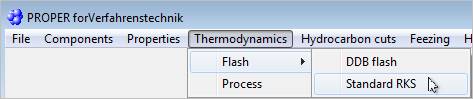
The user can choose between different options for the calculation of the phase equilibrium in "PROPER". The selection of an option starts the calculation. The results are displayed in the same window.
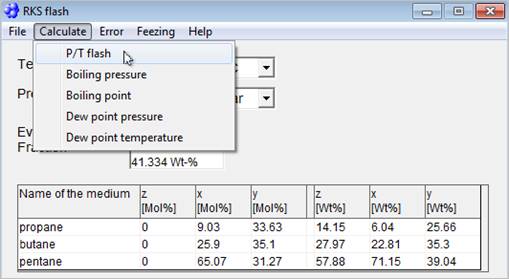
In the "Calculate" menu of the "Standard RKS" (Redlich-Kwong-Soave) window five options are available:
1. P/ T flash:
calculates the phase equilibrium and the phase compositions for a given pressure and temperature
2. Boiling pressure: calculates the boiling pressure for a given temperature
3. Boiling point: calculates the boiling temperature for a given pressure
4. Dew point pressure: calculates the dew-point pressure for a given temperature
5. Dew point temperature: calculates the dew-point temperature for a given pressure
In all cases the evaporated part is calculated for pressure and temperature. The selection of one of these 5 options starts the calculation according to the RKS equation if sufficient data have been entered.
The given or calculated values of temperature and pressure as well as the percentage of vaporization in mol% and wt% are displayed for this state.
Furthermore, the composition of the phases x (liquid), y (gas) and z (feed stream) are displayed along with the component name in mol% or wt%.
The results can be printed with the "Print" menu item in the "Print" menu or be sent to MS Excel.
Additionally to the RKS Flash in the standard version of PROPER the program provides you with a calculation of the phase equilibrium by means of using the program of DDBSt (Dortmund Data Base) in an extended version of PROPER at extra charge. LV has purchased licences of this program and has implemented it into PROPER.
The program calculates the phase equilibrium of a mixture at known pressure and temperature. At given pressure the boiling or dew temperature and at given temperature the boiling and dew pressure can be determined.
It calculates a two-phase flash, i.e. the mixture must only show a maximum of two phases (liquid and gas). The program does not calculate mixtures with a miscibility gap, i.e. mixtures where the liquid phase breaks up in two phases, like for example in a ‚water-toluol‘ mixture.
Two different databases are implemented in Proper and the DDB program. These databases are synchronized to enable transferring mixture data from Proper to DDB.
The number of components of a mixture in DDB is limited to 10!
|
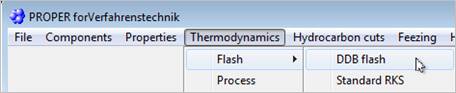
Start the DDB Flash by ´Thermodynamics´ / ´Flash´ / ´DDB Flash´ in the menu. |
|
|
If you have already specified a mixture, the data will be transferred automatically to the DDB mask.
|
|
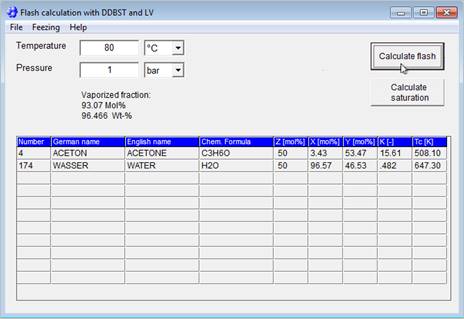
Calculations:
1. Calculate flash
After having entered temperature and pressure, you can start the calculation of the phase equilibrium by pressing the ‘Calculate flash‘ button.
2. Calculate saturation
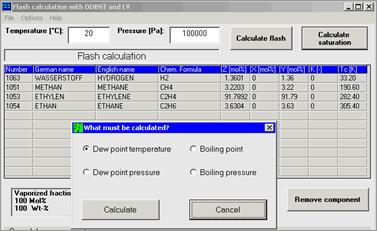
A saturated state, i.e. boiling pressure or temperature at given pressure or boiling temperature or pressure at given temperature, can be calculated by pressing the ‚Calculate saturation‘ button‘. Then you just have to specify the kind of saturated state.
If data for one or more components of the mixture are missing, the calculation is aborted and an error message is displayed.
The given or calculated values of temperature and pressure as well as the percentage of vaporization in Mol % and weight are displayed for this state.
Furthermore, the composition of the phases x [Mol % in the liquid], y [Mol % in the gaseous phase] and z [Mol % in the feed stream] are displayed along with the component name and the critical temperatures.
The k-factors ki = yi / xi, necessary for the design of separation apparatuses are displayed as well. With these factors, the separation factors aij = ki / kj can be calculated.
The results can be printed with the "Print" menu item in the "Print" menu or be sent to MS Excel.
|
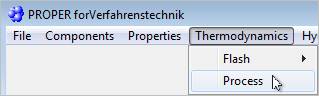
The "Process" window can be reached from the "PROPER" window by ´Thermodynamics´ / ´Process´. After entering the pressures and the temperatures for two operating conditions (processes) and selection of the calculation method in the ´Method selection´ menu (RKS = Redlich-Kwong-Soave or LK = Lee-Kesler) the calculation of the phase equilibrium, vaporization percentage, entropies and enthalpies) starts. |
|
The calculation is started by selection of an option in the "Process selection" menu. The results are displayed in the same window.
The user can change the calculation methods RKS (Redlich-Kwong-Soave) and LK (Lee-Kesler) in the "Method selection" window by mouse-click or keyboard. The required input data depend on the calculation option, which can be selected in the "Selection" menu:
1. P/T-flash: The phase compositions, the percentage of vaporization, the entropies and the enthalpies are calculated for both given pressures and temperatures. Input of pressure and temperature for both conditions is required.
2. Adia flash (isenthalpic change of state, adiabatic throtteling): calculates the temperature for the second condition for an adiabatic, isenthalpic throttling path. Both pressures and the temperature of the first state must be given. The pressure for the second state has to be less than the pressure for the first state.
3. Isa flash (isentropic change of state): calculates the temperature of the second state for an isentropic change. Both pressures and the temperature for the first state must be given.
4. Qzu / Qab (isobaric change of state): determines the temperature for the second state for an isobaric change of state. Both pressures, the temperature for the first state and the added (positive value) and extracted (negative value) heat have to be given.
The input of the added or extracted heat is possible only for the Q in / Q out (isobaric) option. The calculation is started by selection of an option in the "Selection" menu.
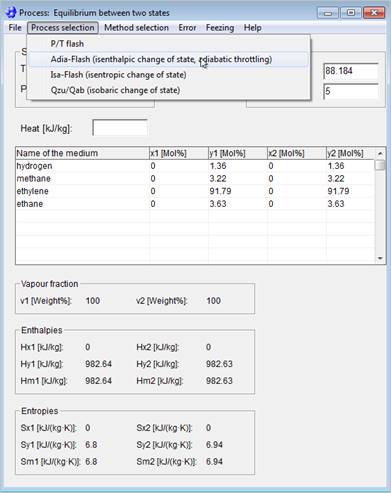
The results are displayed in the "Process" window. The phase compositions, the percentage of vaporization [Weight % vapour], the entropies and the enthalpies for both conditions are displayed. As an additional result the temperature of the second state is displayed for the options "Adia flash" and "Q in / Q out".
You can send the results to a printer or to MS Excel.
|
The calculation of the properties of hydrocarbon cuts with PROPER is available only if the extended version has been installed. The "Hydrocarbon cuts" window can be reached from the "PROPER" window by ´Hydrocarbon cuts´ / ´Calculate´. |
|

Starting from an ASTM D86 boiling point curve and a density of 15°C PROPER calculates the mean properties of this hydrocarbon cut for given pressure and temperature
Before calculating the properties for a single temperature, pressure and temperature have to be defined. The values have to be entered in [Pa] and [°C].
For the calculation of properties over a temperature range additionally a second temperature and the number of steps have to be entered.
In the ´Calculate´ menu you can either choose to calculate for a single temperature ("Single-temperature values" menu item) or to calculate for a temperature range ("Temperature range" menu item). The results for both calculations are displayed in the "Properties of hydrocarbon cuts” window:
|
|
Basic Values: VABP: Volume average boiling point WABP: Weight average boiling point MABP: Molar average boiling poin CABP: Cubic average boiling point MeABP: Mean average boiling point UopK: Watson characterization factor MW: Molecular weight APIgr: API gravity Tc: Critical temperature Tpc: Pseudo critical temperature Ppc: Pseudo critical pressure
|
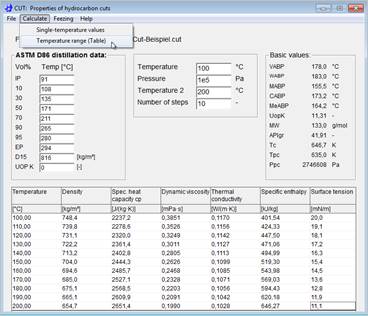
The boiling analysis and the density can be saved in a file by ´File´ / ´Save boiling analysis as´ You can enter any name for the file that is saved with the extension ".CUT" automatically. In the same menu the saved data can be recalled by PROPER with the ´Load boiling analysis´ menu item.
The results are displayed in the "Properties of hydrocarbon cuts" window. After the calculation for a single temperature all results are displayed directly in the window. If a number is red, it is outside the range of validity of the correlation.
Errors occurring during the calculation, like missing data in the data library, values exceeding the range of validity of an equation etc. are displayed in the "Errors" window. The window can always be displayed by ´Display´ / ´Errors´.
Eq. 1: 
with 
Eq. 2: 
Eq. 3: 
Eq. 4: 
Eq. 5: 
with 
Eq. 6:  with
with 
Eq. 7: 
Eq. 8: 
For all equations:
T = temperature in K
Tc = critical temperature in K
For Eq. 1 – 6:
pvp = vapour pressure in bar
pc = critical pressure in bar
For Eq. 7:
pvp = vapour pressure in kPa
Note on equation 6: If not stated different:
vpA = Tc (critical temperature in K)
vpF = pc (critical pressure in bar)
The vapour pressures calculated by using equations 1 – 7 are converted to Pa by the program for internal use.
vpA, vpB, vpC, vpD, vpE, vpF, vpG, vpH Constants of the vapour pressure equations
Eq. 1:  with
with  in J/(mol·K)
Eq. 2:  with
in J/(mol·K)
with
in J/(mol·K)
Eq. 3: with in kJ/(kg·K)
For all equations:
T = temperature in K
R0 = 8,3145 J/(mol·K)
cpA, cpB, cpC, cpD, cpE Constants
Eq 1:  h in mPa·s
Eq. 2:  h in mPa·s
Eq. 3:  h in mPa·s
Eq. 4:  h in mPa·s
Eq. 5:  h in mPa·s
Eq. 6:  h in Pa·s
Eq. 7:  h in Pa·s
Eq. 8:  h in Pa·s
Eq. 9:  h in mPa·s
For all equations:
T = temperature in K
 =
temperature in °C
=
temperature in °C
visA, visB, visC, visD and visE Constants
Careful:
For eq. 1 – 5 and 9 : h in mPa·s
For eq. 6 – 8 : h in Pa·s
Viscosities calculated by using equations 6 – 8 are converted to mPa·s by the program for internal use.

 in
W/(m·K)
in
W/(m·K)
T = temperature in K
lamA, lamB, lamC and lamD Constants
Eq. 1:  lL in W/(m·K)
Eq. 2:  lL in mW/(m·K)
T = temperature in K
=
temperature in °C
lamA, lamB und lamC Constants
Eq. 1: 
Eq. 2: 
s in mN/m
T = Temperature in K
Tc = Critical temperature in K
J = Temperature in °C
A, B, C und D Konstanten
The database and the methods have been taken from:
Reid R. C., Prausnitz J. M., Poling B. E.: The Properties of Gases and Liquids (Fourth Edition), Mc Graw-Hill Book Company.
Poling B.E, Prausnitz J.M., O’Connell J.P.: The Properties of Gases and Liquids (Fifth Edition), Mc Graw-Hill Book Company