RDV module
The module RDV serves for the determination of the pressure drop in the tube region of shell-and-tube heat exchangers. The total pressure drop in flow through tubes of a shell-and-tube heat exchanger consists of several individual pressure drops:
· Flow into the inlet nozzle
· Flow into the tubes
· Flow through the tubes (friction)
· Flow through the diversions
· Flow out of the tubes
· Flow out of the outlet nozzle
·
For the calculation of the total pressure drop, it is therefore necessary to know the exact exchanger geometry and to determine the individual pressure drop parts from the flow conditions. If the geometry of the exchanger and the material data of the fluid are given, the individual pressure drops are determined and displayed separately. The sum of these individual pressure drops is the total pressure drop. As the module is linked with property and geometry modules of the program system ATLAS, almost all input values can be imported.
Literature:
Verfahrenstechnische Berechnungsmethoden / Teil 1: Wärmeübertrager VCH Verlagsgesellschaft, Weinheim, 1987
Start the module RDV with the menu item 'Chapter' in the 'Atlas menu'. The input and output mask of RDV is displayed. Now you can enter properties and geometrical variables manually.
To import properties and geometrical variables from your module package (WTS, VERD, KOND or AC) it is necessary that all values required for the calculation of the pressure drop in the tube bundle exist in the input and output mask of the module you are using. You should also be careful that the geometrical data of the nozzles at the inlet and outlet of the tube bundle are entered in the mask.
After successful loading the input and output mask of the RDV module is displayed. This input and output mask is divided into different sections for the properties, the geometrical values, the flow-technical variables, the correction factors and the pressure drop. These variables are shown in the corresponding equations at the end of the mask.
Now you can modify the values by manual inputs or calculate the values again. All modifications are transferred to the other loaded modules. The general functions of all ATLAS modules are available.
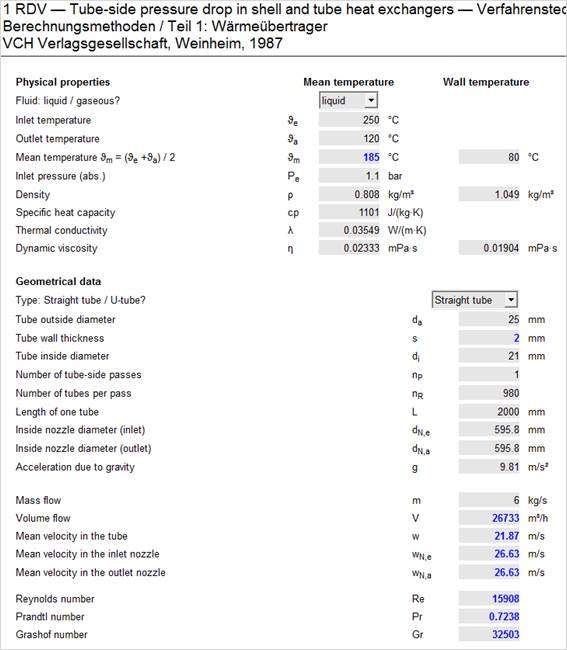
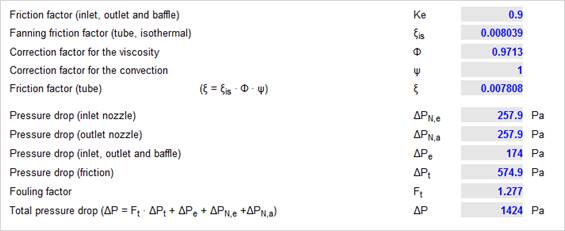
Input and output mask of the RDV module
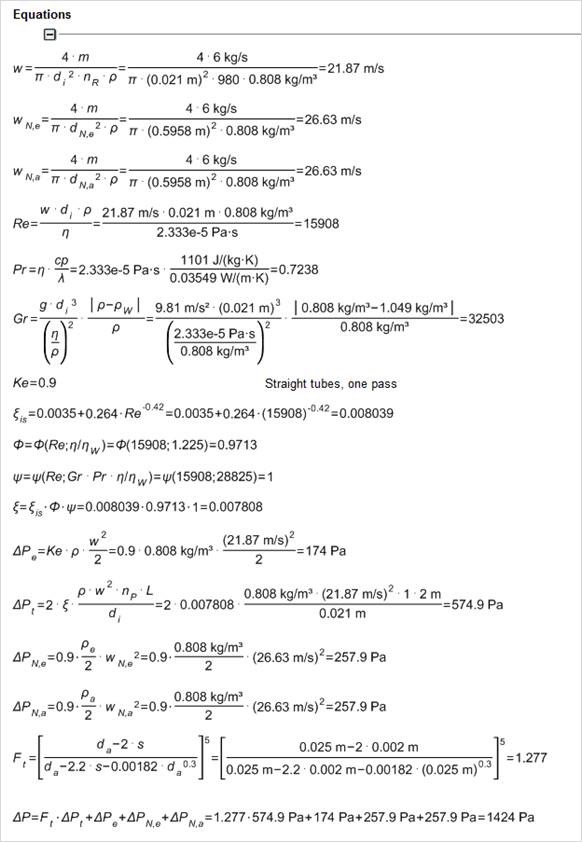
Equations in RDV