Coaxial Tube Heat Exchanger (coiled double-pipe) in COIL
The entries for the calculation of a coaxial tube heat exchanger are done in the mask 'Basic data selection'.
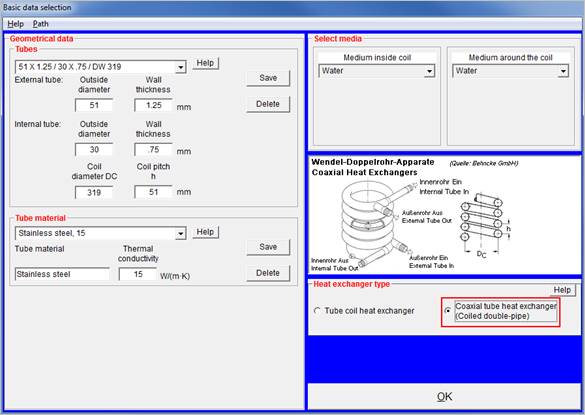
This mask is the first mask to appear after program start. By selecting the option Coaxial tube heat exchanger' in the ‘Heat exchanger type’ field, the calculation is initialized.
There are several tubes and pipes in the
database which can be selected in the selection boxes
'Internal tubes' and ‘External tubes’. The data of these
tubes (outside diameter and wall thickness) can be saved.
If you want to use tubes which are not listed in the selection box, you can overwrite the values for outside diameter and wall thickness directly in the fields. You can change the values at a later time in the COIL mask as well.
Select the tube-side and shell-side media and confirm your selection by pressing 'OK'. The next mask 'Visual COIL' is displayed.
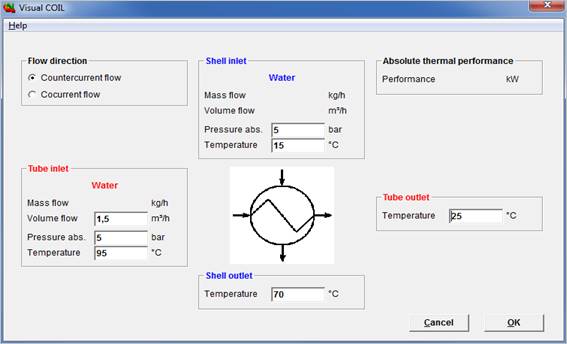
In this mask you may enter your system data for the tube-side and shell-side media. Confirm your entries with 'OK'. The program switches to the COIL input mask.
Here you may complete or correct your system data (pressure, temperature, mass flow).
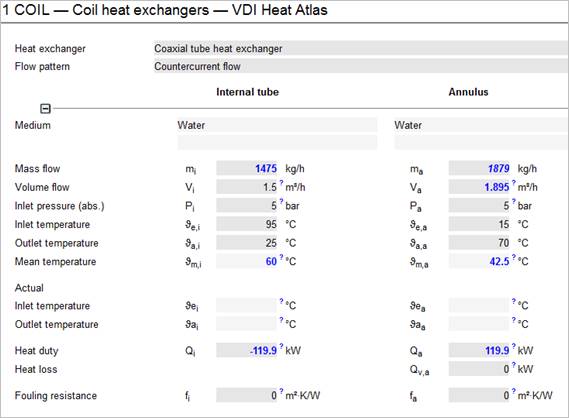
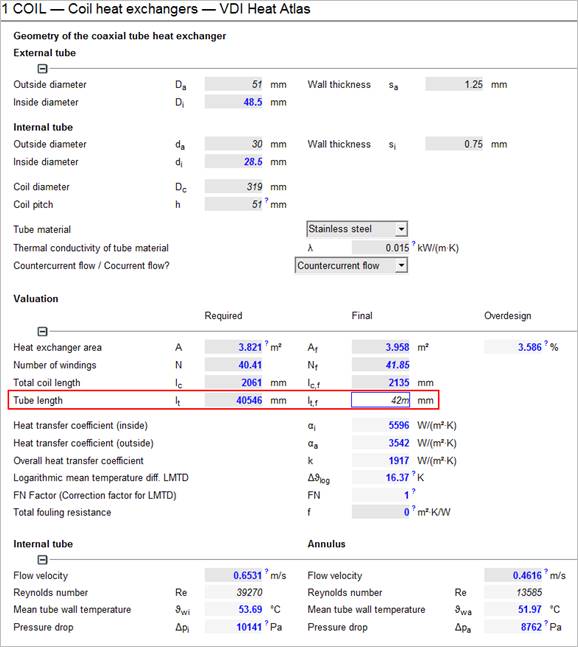
If your system data are complete, the calculation is started and the required tube length is calculated.
>> Enter the final tube length which is the tube length of the manufactured heat exchanger. The exchanger is recalculated with this tube length.
Please adjust the final bundle length to the required bundle length. The difference between required and final bundle length is the ‘Overdesign’.
Alternatively you might enter the final heat exchanger area, the final number of windings or the final total coil length (height of the coil).