Tubesheet library
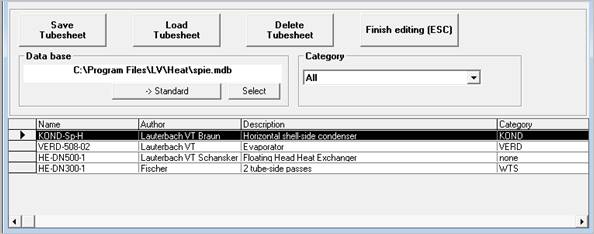
Display after ´Edit tubesheet library´
All entries that have been made in the input mask of the SPIE module are taken into the data base. This also includes the current status of the tubesheet (locked or unlocked). You can see the current status in the menu item ´Tubesheet / Lock tubesheet´
The current record, indicated by the arrow in the left margin and dark grey bar across all columns, is used for the calculation. This means, if the tubesheet library has been called up from SPIE, the data is entered in the current SPIE mask. Data existing there is overwritten in this case. If the tubesheet is locked, the menu item ´Tubesheet / Lock tubesheet´ will be ticked again.
In case the tubesheet library has been called up from WTS, KOND or VERD a new SPIE chapter will be activated and the data will be entered there. Some values will also be carried over to the current calculation module (WTS etc.).
Important note for the programs WTS, KOND and VERD!
In the programs WTS, KOND and VERD a tubesheet can only be loaded in the form ‚Selection of basic data’. Loading a tubesheet in the SPIE module is not possible in the programs WTS, KOND and VERD.
When a tubesheet was loaded in the programs WTS, KOND and VERD the tubesheet will be locked irrespective of the status during the saving (see. manual WTS, KOND or VERD ‚Tubesheet lock / unlock’)
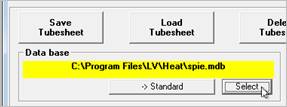
The tubesheet data can be distributed over different data bases. All operations refer to the currently active data base, the name of which is entered in the field below ´Data base´. The standard data base is the one used when activating the form. This data base is indicated by the yellow background colour in the data base field. This setting can be changed by pressing the button ->Standard or in the menu with ´Data base / Specify current as standard´.
If the standard data base does not exist during the calling up or if none has been selected yet (in this case spie.mdb is used), automatically a new data base will be created.
|
With the help of this function another tubesheet data base can be loaded. If no file extension has been given, ´*.MDB´ is automatically added. The function can also be executed via the menu item ´Data base / Select other data base.
|
|
With the help of the field ´Category´ it is possible to classify data within the library. All categories so created as well as the category ´All´ can be selected in the list field. If a category has been selected, only those records are displayed, which correspond with the selection in the field category and additionally all, for which ´none´ has been entered. ´none´ is the standard value used when new records are entered.
Changes in category are made directly in the table and take effect immediately after leaving the current row.