Problem solutions
For the present version of the program package ROHRNETZ (PIPE NETWORK) additional modules of the program package ATLAS may be available. If additional modules are available they are displayed on the right-hand side of the pipe input mask.
For working without additional modules the input data are entered as usual. In the field "Integrate modules" of the input mask for the pipe data (on the right-hand side) do not select "Activate".
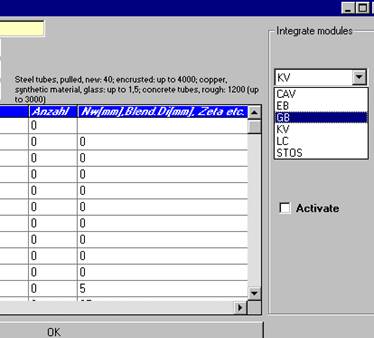
For each pipe run that the calculation has to be activated for by the additional module, you have to click both the module name and the box "Activate" separately.
Initial situation: An existing file has been loaded.
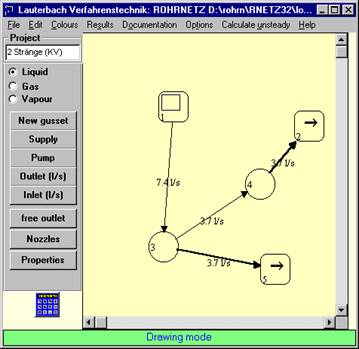
Select the pipe run, click the module name (example: module RDV) and click “Activate”.
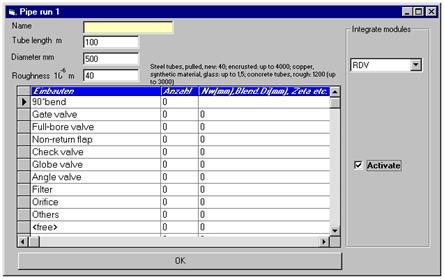
Click "OK" to return to the initial screen. If the additional module or the ActiveX-Server cannot be found or another error occurred, an error message appears.
If you want to use additional modules for the calculation click "Calculate". The ActiveX-Server starts the module. The input mask of the module appears. It is absolutely necessary to complete the empty fields of the input mask. Please ensure that all values are available so that this module can calculate the correct values and transfer them to the program package ROHRNETZ (PIPE NETWORK). Go through the mask and enter the missing data.
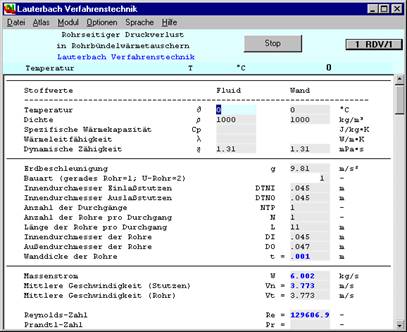
After completing the empty input fields the mask of the ATLAS module looks as follows:
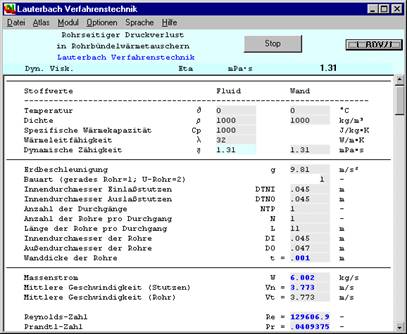
Click the "Stop" button in the upper part of the input mask to leave the ATLAS module.
You return to the basic mask of the program package ROHRNETZ (PIPE NETWORK).
The values (in this example in the run 1 – 3) have been replaced by the values calculated by the additional module of the program package ATLAS (in this example the module RDV).
During new calculations the additional module remains in the background. The input fields are known. For every calculation process the current data are transferred to the additional module and the results are transferred from ROHRNETZ (PIPE NETWORK) automatically.
If you use the additional module for several pipe runs, you may have to fill in the missing input values several times in the input mask of the additional module of the program package ATLAS (see above).
If decimal values are not accepted or displayed correctly the following error could be the reason:
As decimal separation character a decimal point has to be used, not the comma.
Depending on the national settings of your operating system there may be deviations.
In the field “Others” of the pipe input mask either a pressure drop factor for other internals or a pressure difference value is to be entered.
To input a difference pressure value proceed as follows:
Go to the line “Others” in the input mask for the pipe internals.
Enter the letter ‘p’ for “Anzahl” (= number).
Enter the pressure difference for this pipe run expressed in Pascal into the third column.
The program automatically calculates the flow velocities and converts the pressure difference, the density entered in "Properties" and the flow velocity in this pipe run into a pressure drop factor. If the pipe mask is opened again, you can see that the value 1 has been entered for “Number” and that the calculated pressure drop factor has been entered into the third column.
To get a printout corresponding to the screen representation it is better to copy the screen into the clipboard with the commands in the "File" menu or to save it as WMF file. When formatting the print output by the command “Print” in the "File" menu it may take several trials to get the desired result.
The screen view can be designed with the mouse very easily.
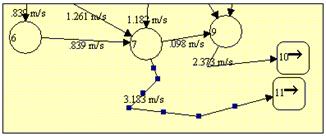
The pipe runs can be moved as you like by dragging the small button in the middle of the pipe. After each modification further buttons appear. Drag the pipe with pressed left mouse key to the desired position.
In the same way the gussets can be adapted in shape and size.
Click on the gusset and modify the size with pressed left mouse key on the buttons.
At least one defined outlet has to be defined. Add a defined outlet.
The suction line of the pump is not displayed. The difference between the quantity delivered on the pressure-side and inlet quantities is supplied into the system by the suction line, which is not displayed.
A pump can also be used like a high tank (“Supply”). In this case only one pipe is connected to the pump.
If numerical values in the output seem to be wrong or not accurate, one of the following possibilities may help:
- Select a higher display accuracy to display possible decimal places.
Select a higher arithmetical accuracy to achieve convergence. If required, the calculation process can be stopped after reaching a sufficient accuracy by clicking the box “Cancel” at the left-hand bottom of the screen.
Increase the number of iteration steps